
Improve your ads tracking with Meta Conversions API
Meta’s ad platform provides a JavaScript tracking pixel that helps attribute actions and purchases on your website back to your ad campaigns.
To improve tracking accuracy, Bottle integrates with Meta’s Conversions API (CAPI). CAPI enables higher-fidelity purchase tracking, including cases where browser-based tracking may be limited.
Once your CAPI access token is set up, all purchases will be sent to your Meta pixel. This helps you better understand which purchases are being driven by your Meta ad campaigns.
To learn more about the Conversions API, visit Meta’s developer documentation.
How to Generate a CAPI Access Token
Open Facebook Ads Manager.
Navigate to Events Manager.
Create a new pixel or open an existing pixel.
Go to Settings.
Find and click Generate Access Token.
Copy the access token.
Add the Access Token to Bottle
Open your Bottle dashboard at
https://dashboard.bottle.com/storefrontPaste the access token into your storefront settings.
Save your changes.
Once saved, CAPI tracking will begin automatically.
Tracking Custom Events
After CAPI is enabled, you can create custom events to track specific purchase behaviors, such as new versus returning customers.
We recommend starting with two custom purchase events:
New customer purchase
Existing customer purchase
Use the following event parameters:
customer_status contains "new"
customer_status contains "existing"
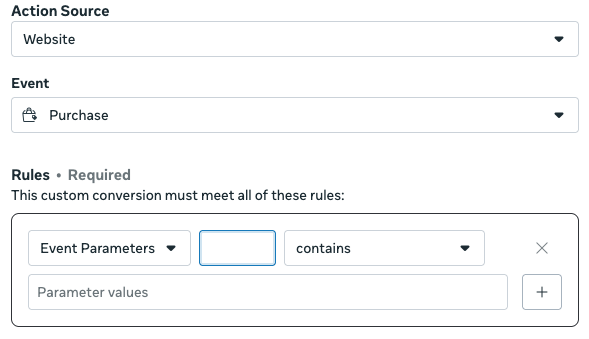
For more details on setting up custom events, see Meta’s Custom Events documentation.